
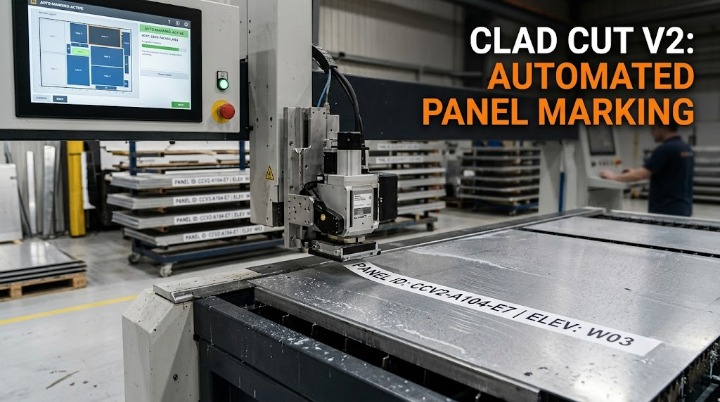
Workers manually labeling cut panels with marker pens can inevitably mismark panels that are then installed in wrong locations, a mistake discovered only during facade inspection.
Why Manual Marking Is Prone to Error at Volume
Manually labeling each cut panel with project, ID, and elevation reference information, particularly across a high volume of panels processed daily, introduces the ordinary human error rate inherent to any repetitive manual task — a mismarked panel is not a rare anomaly but a statistically expected outcome at sufficient volume.
Where Mismarking Becomes a Genuine Installation Problem
A mismarked panel does not announce itself as an error at the point of marking — it looks like a correctly labeled panel to anyone handling it afterward, meaning the mistake only becomes apparent once the panel reaches its intended installation location and is found not to actually match that position.
Why This Discovery Point Makes Correction Especially Costly
Discovering a mismarked panel during facade inspection, after installation has already been attempted, requires removal and re-installation of the correct panel — a far more disruptive and expensive correction than if the marking error had been caught before the panel ever left the shop floor.
Generating Panel IDs and Installation References Directly From Nesting Layout
After illustrating the cost of panel misidentification and the removal and re-installation cycle it triggers, the fix is generating panel identification directly from the nesting data itself, rather than relying on manual marking after cutting. Clad Cut V2’s automated marking system generates panel ID labels and installation references directly from the nesting layout, eliminating the manual marking step where mismarking errors otherwise originate.
Standardize your panel marking — Activate Clad Cut V2’s auto-marking system.